Data Packages
2025-11-11
Outline
data in packages
code examples in the help file
checking a package
Resource:
- usethis by Hadley Wickham and Jenny Bryan
- R packages (2ed) by Hadley Wickham
Package usethis and R packages book
R package development is not generally linear, we generally need a lot of details on specific things:
usethis is a package to help with organizing the workflow in packages as well as other non-package projects
README gives an overview of the functionality of usethis.
R packages (2ed) by Hadley Wickham is giving a general overview of the workflow with details
Data in a package
Assume we have the data frame mydata (there are better names :)).
use_data
function (..., internal = FALSE, overwrite = FALSE, compress = "bzip2")
use_data places a data object into the data folder.
internal data (used by the package not by the users of a package) is placed in the file sysdata.rda
Your Turn
Include the diamonds data as a dataset in your package
What does R CMD check say to that?
Data documentation
- Documenting data in packages: https://r-pkgs.org/data.html
#' Prices of 50,000 round cut diamonds.
#'
#' A dataset containing the prices and other attributes of almost 54,000
#' diamonds.
#'
#' @format A data frame with 53940 rows and 10 variables:
#' \describe{
#'   \item{price}{price, in US dollars}
#'   \item{carat}{weight of the diamond, in carats}
#'   ...
#' }
#' @source \url{http://www.diamondse.info/}
"diamonds"
General convention is to have a data.r file in the folder R that consists of data documentation.
Data provenance
https://r-pkgs.org/data.html
Keep the data set’s origin story!
Origin story has at least two parts: original data and the script that converts the raw data to the R package data:
script: has extension
.Rand goes into a folder calleddata-raw(not theRfolder!!)in folder: inst/extdata include (some) of the raw data (csv, pdf, …)
The folder inst is special in an R package: inst is a folder that is being unloaded into the R library during the installation process.
Your Turn
Expand the hello function by sampling from the diamonds data and reporting the carat weight as
“You are a
Run R CMD check on this
Using data sets in packages
Activate the data in your function environment:
data(diamonds, envir = environment())
See also ‘Good Practices’ under ?data Details
Examples in packages
The Roxygen tag
@examplesallows you to write code as an example in the help file.Always make use of this feature! It is not only good practice, it is also a first step in checking that your package is running properly - for new packages CRAN expects an example for every function
Your example has to be stand alone, i.e. if you are using some data, it needs to be included in the package.
#' @examples
#' # you can include comments
#' x <- 1
#' 5*x
#' hello("this is a test")
Checking packages
The Comprehensive R Archive Network (CRAN) is the place for publishing packages for general use.
Once a package is on CRAN it can be installed using the command
install.packages("<package name>")CRAN has installed certain rules that all packages must comply before being uploaded
devtools::check() or Ctrl/Cmd + Shift + E runs these tests on your local package
Similar to check() it looks for the package to check in the working directory
Three levels of faults
ERROR: severe problem that has to be fixed beofr esubmitting to CRAN - you should fix it anywayWARNING: also has to be fixed before going onto CRAN, but not as severe.NOTE: mild problem. You should try to get rid of all notes before submitting to CRAN, but sometimes there is a specific reason that does not allow you to fix all notes. In that case, write a careful description why this note happens in the submission comments.
Checking cycle
R CMD check results
0 errors | 0 warnings | 0 notes
This is what you want to see, but not a likely outcome of your first run in a real package
Checking workflow:
Run
devtools::check(), or pressCtrl/Cmd + Shift + E.Fix the first problem.
Repeat until there are no more problems.
Continuous Integration
one of the problems of ensuring that a package is sound, is to actually remember to run the tests
Github actions allows us to create an automatized workflow (written in yaml): e.g. every time you push a change, the package is being built and checked for CRAN compliance
github actions can be adjusted to specific use cases - for a start use example actions :)
the command
usethis::use_github_actions()sets up a folder .github > workflows with the fileR-CMD-check.yaml. (This will only work out of the box when there is one package in the repo, and the package is not in a subfolder)
Connecting the package to git & github
The usethis package allows us to first turn on git (locally):
and then create a github repository:
… and while we are at it, also include a readme file:
Package website
The package pkgdown creates web pages based on all the files in a package
pkgdown supports making websites for your package (see e.g. x3ptools, ggplot2, … and soon yours)
Process:
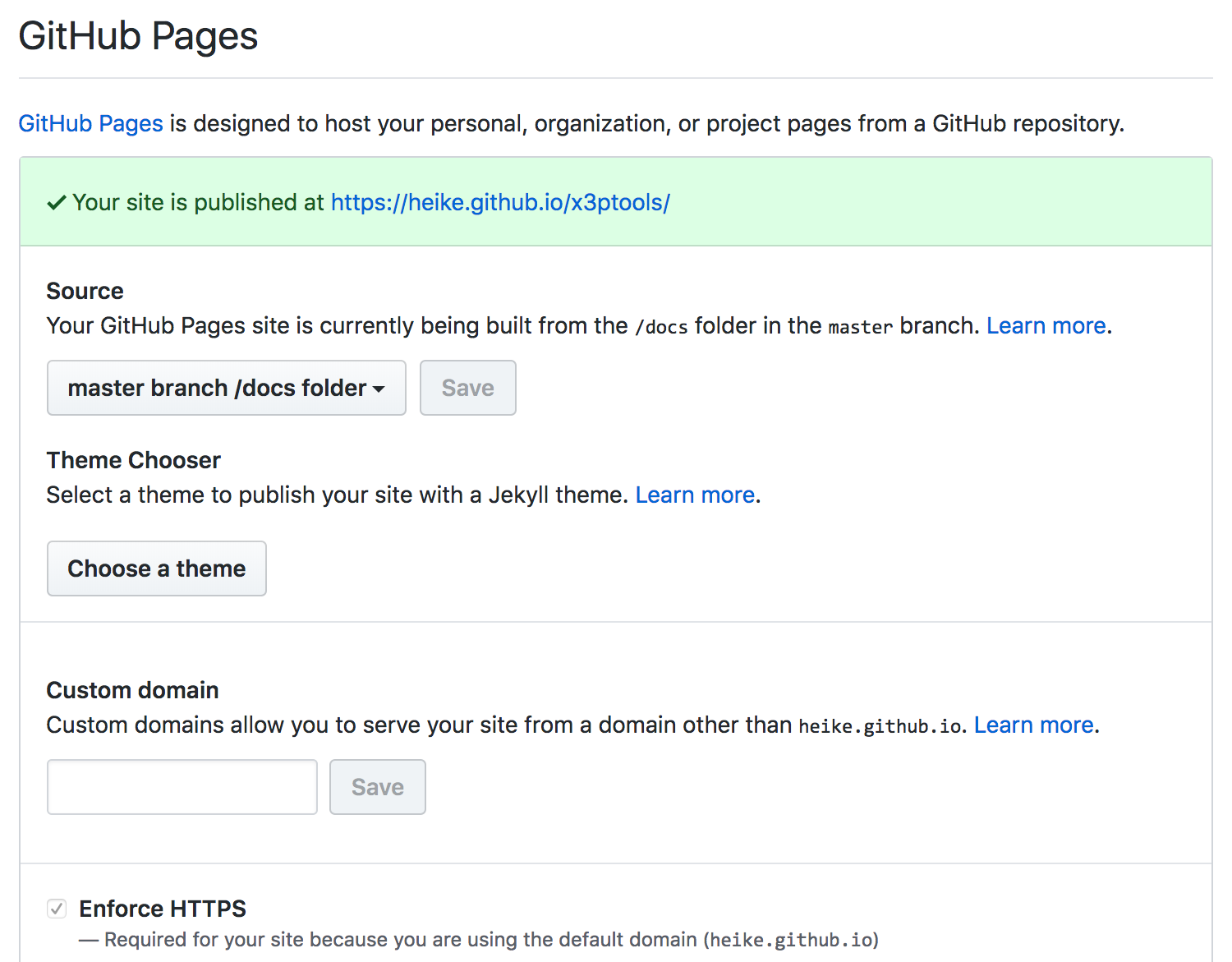
pkgdown::build_site()Assuming your package has a github repo, add the docs folder to the repo
In Settings for your repo, switch GitHub Pages to the docs folder (see screenshot)